Artifacts: Build Things Alongside the Chat
What Claude's Artifacts are — a live side panel for code, documents, and diagrams you can preview, edit, and iterate on.
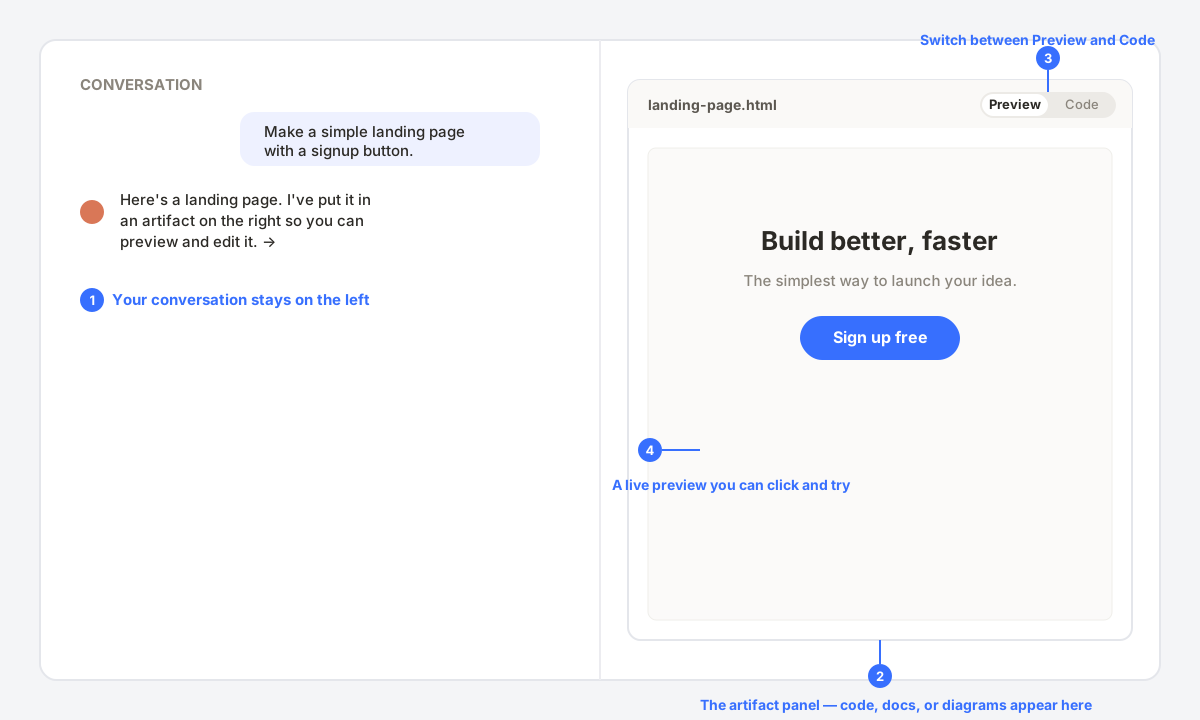
Most of the time Claude answers inside the chat. But when it makes something you'd want to use — a web page, a document, a chart, a block of code — it puts that in an Artifact: a panel that opens on the right, separate from the conversation, where you can see, edit, and build on the result.
When an Artifact Appears
You don't turn Artifacts on — Claude opens one automatically when the output is substantial and self-contained. Ask it to «make a landing page,» «write a project brief,» or «draw a flowchart,» and the result lands in the panel instead of scrolling by in the chat.
| Artifact type | Example |
|---|---|
| Web pages / apps | A working HTML/CSS/JS page with a live, clickable preview. |
| Documents | A structured report, brief, or article you can copy out. |
| Code | A file or script, shown with syntax highlighting. |
| Diagrams | Flowcharts and simple visuals rendered from a description. |
What You Can Do With It
- Preview vs Code: for web pages, flip between the live preview and the underlying code.
- Iterate: keep chatting — «make the button green,» «add a footer» — and the artifact updates in place.
- Copy or download the result when it's ready to use.
- The conversation stays on the left, so you always have the context that produced it.
Artifacts are what turn Claude from a chat box into a place you actually build in. New here? Start with the interface tour, or see the full Claude overview.