SpeechGen
AI Text-to-Speech Converter for Realistic Voiceovers
Feed it a PDF, a URL or a screen recording and it returns a branded video with script, voiceover and captions. Free tier; paid from $23.20 a month.
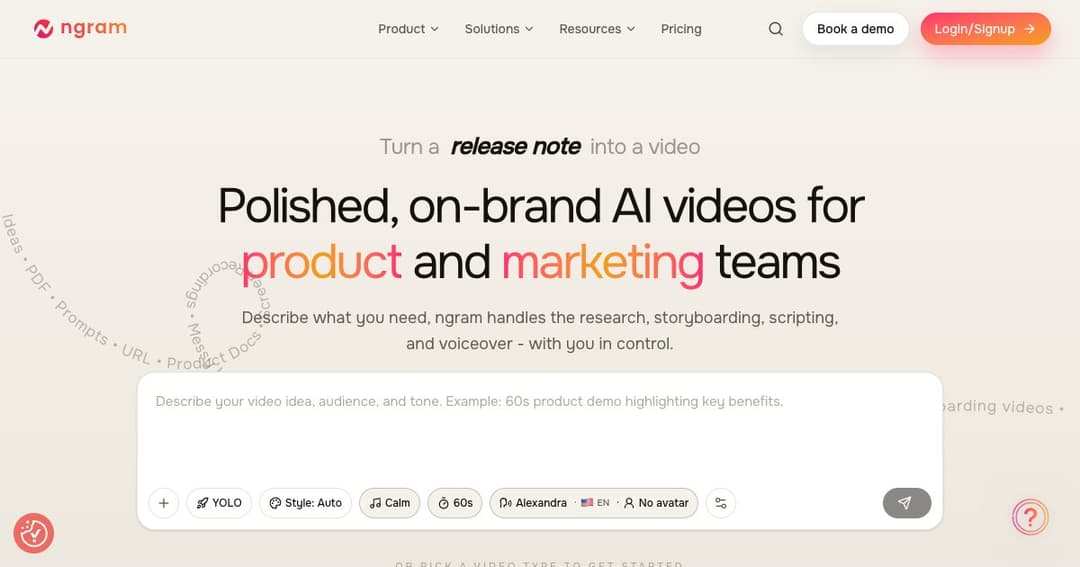
ngram makes videos out of things you already have. Point it at a PDF, a documentation page, a screen recording or a block of text, and it researches the material, builds a storyboard, writes a script, records a voiceover and renders a branded video. The input is work you have already done; the output is the format nobody has time to produce.
That framing is what separates it from the text-to-video tools that generate footage from imagination. ngram is not trying to invent a scene — it is trying to turn your release notes into something watchable. The distinction matters because the second job has a correct answer and the first does not.
The customer list leans corporate rather than creator: Veeva Systems, DP World, Genpact, HubSpot, Zapier, Deel and SafetyCulture among others, with G2 naming it a High Performer in AI video generation through 2026.
Before anything renders, you see the storyboard. This is a small design decision with a large practical effect: reviewing a plan takes seconds and reviewing a finished video takes minutes, and you catch the misunderstanding at the point where fixing it is free.
Editing afterwards happens in plain language. Telling it to shorten scene two is faster than opening a timeline, and it keeps non-editors in control of the result rather than handing the file to someone who owns the software.
Feed it a raw screen capture and it removes dead air, adds automatic zooms on the thing you are clicking, and drops in callouts. Anyone who has recorded a product demo knows that the recording takes four minutes and tidying it takes an hour; this is the hour.
For product and customer success teams this is probably the strongest single reason to look at it. Tutorial videos age out every time the interface changes, and a tool that makes re-recording cheap is what keeps documentation current.
A brand kit holds your logo, colours and fonts, and output comes in 16:9, 9:16 and 1:1 so the same source produces a landscape explainer and a vertical social cut without redoing the work. Motion graphics and captions are generated rather than added by hand.
Two limits run in parallel: credits, which meter the work, and seconds of premium AI video generation, which cap the output. Annual billing takes 20% off, and the prices below show the annual rate.
| Plan | Annual | Monthly | Credits | Premium video | Users |
|---|---|---|---|---|---|
| Free | $0 | $0 | 600 one-off | Up to 60 sec | 1 |
| Basic | $23.20/mo | about $29 | 3,000/month | Up to 300 sec | 1 |
| Premium | $47.20/mo | about $59 | 10,000/month | Up to 1,000 sec | 1 |
| Ultimate | $239.20/mo | about $299 | 50,000/month | Up to 5,000 sec | Up to 3 |
| Enterprise | Custom | Custom | Custom | Custom | Custom |
The seat limits deserve attention. Everything below Ultimate is a single user, and Ultimate itself allows three. This is priced as a tool for one person who makes videos, not as a platform for a team, and a marketing department of five will land on Enterprise faster than the price ladder suggests.
The gap from Premium at $47.20 to Ultimate at $239.20 is fivefold for five times the credits, so it scales honestly — but there is nothing in between, and 1,000 seconds a month is roughly sixteen minutes of finished video, which a busy product team will exceed.
Every release needs an announcement video that nobody has time to make. Turning the release notes you already wrote into a clip is the exact job this does, and it is why the customer list looks the way it does.
Tutorials go stale the moment the interface moves. Cheap re-recording is what keeps a help centre from filling with videos of a product that no longer looks like that.
One source, three aspect ratios, brand kit applied automatically. The tedious part of social video is not making it once, it is making it three times in three shapes.
Pitch updates, investor notes, demo follow-ups. The single-seat pricing is aimed squarely at one person producing for a whole company, which is the reality at most early-stage startups.
There is a free tier with 600 credits granted once and up to 60 seconds of video. It is an evaluation rather than a working plan; paid tiers start at $23.20 a month billed annually.
PDFs, URLs, documents, images, plain text and screen recordings. The screen recording path is the one with the most post-processing behind it — automatic zooms, dead-air removal and callouts.
Yes, in two places. You approve the storyboard before rendering, and afterwards you can edit in plain language rather than in a timeline — asking it to shorten a scene rather than dragging a clip.
Yes. Exports come in 16:9, 9:16 and 1:1 from the same source, which is the point for anyone publishing to both YouTube and short-form feeds.
One, on every plan up to Premium. Ultimate allows three. Beyond that you are in an Enterprise conversation, which is worth knowing before you plan a team rollout.
Companies, on the evidence. The named customers are enterprise software and logistics businesses, and the feature set — brand kits, product demos, onboarding — is built around internal and marketing communication rather than entertainment.
ngram solves a narrow problem well: you have written the thing, and it should be a video, and turning it into one costs an afternoon you do not have. Storyboard approval before rendering and plain-language editing are the two details that make it usable by people who do not edit video.
Check the seat limit before anything else. As a tool for one person producing video for a company it is well priced; as a platform for a team it jumps to Enterprise sooner than the published ladder implies.