
Arcwise
आर्कवाइज़: गूगल शीट्स के अंदर एआई-संचालित डेटा विश्लेषण
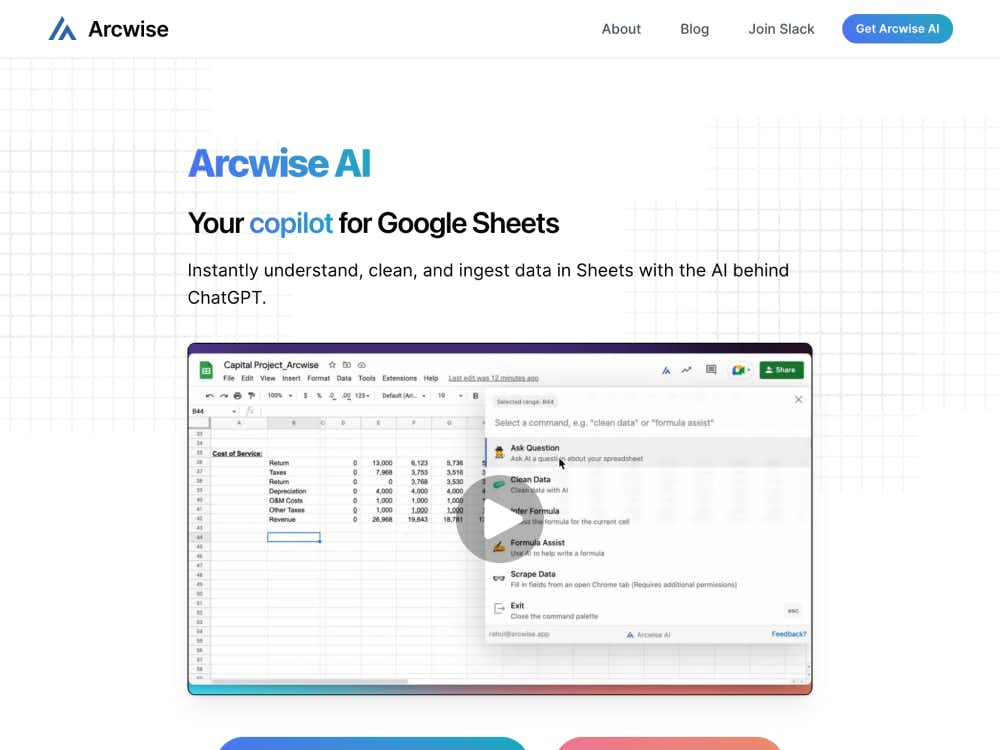
आर्कवाइज़, Google शीट्स को एक शक्तिशाली AI डेटा विश्लेषक में बदल देता है। आपके द्वारा नियंत्रित प्रासंगिक AI मॉडल के साथ व्यावसायिक डेटा का तुरंत अन्वेषण, विश्लेषण और विज़ुअलाइज़ेशन करें।
आर्कवाइज़ एक अगली पीढ़ी का AI टूल है जो आपके मौजूदा Google शीट्स वर्कफ़्लोज़ में आसानी से एकीकृत हो जाता है। स्प्रेडशीट्स, डैशबोर्ड्स और BI प्लेटफ़ॉर्म के बीच स्विच करने के बजाय, आर्कवाइज़ सारी जानकारी एक ही जगह—आपकी स्प्रेडशीट—पर लाता है। यह ऐसा है जैसे आपकी शीट में ही एक डेटा विश्लेषक मौजूद हो।
सामान्य AI टूल्स के विपरीत, आर्कवाइज़ आपके व्यावसायिक संदर्भ के अनुसार अनुकूलित होता है। आप अपने मॉडल को बेहतर बना सकते हैं या आर्कवाइज़ को अपने डेटा से एक मॉडल बनाने दे सकते हैं। यह सुनिश्चित करता है कि सभी उत्तर, विश्लेषण और सुझाव आपके संगठन के विशिष्ट मीट्रिक, शब्दावली और लक्ष्यों के लिए प्रासंगिक हों।
आर्कवाइज़ आपके डेटा वेयरहाउस (जैसे स्नोफ्लेक, बिगक्वेरी, या डेटाब्रिक्स) से जुड़ता है और BI टूल्स के साथ एकीकृत होता है। एक बार लिंक हो जाने पर, आप अपनी स्प्रेडशीट छोड़े बिना प्रश्न पूछ सकते हैं, विश्लेषण कर सकते हैं, या पूरे डैशबोर्ड का अन्वेषण कर सकते हैं।
«पिछली तिमाही में राजस्व में गिरावट का क्या कारण था?» जैसा प्रश्न टाइप करें और डेटा-समर्थित स्पष्टीकरण, प्रवृत्ति विश्लेषण और यहां तक कि दृश्य भी प्राप्त करें — जो स्वचालित रूप से आपकी शीट में उत्पन्न हो जाएंगे।
प्रत्येक AI-जनित परिणाम को स्पष्ट दृश्यों — चार्ट, ग्राफ़ और हीटमैप्स के साथ जोड़ा जाता है — ताकि आप अलग से विश्लेषण उपकरण की आवश्यकता के बिना आसानी से रुझानों और विसंगतियों की पहचान कर सकें।
क्या आप अपने डेटा में समस्याएँ ढूंढ रहे हैं? आर्कवाइज़ आपको परिणामों में गहराई से जाने, मूल कारणों की पहचान करने और स्रोत पर डेटा बिंदुओं को सही करने की सुविधा देता है—यह सब आपके स्प्रेडशीट परिवेश में ही।
अपना खुद का बड़ा भाषा मॉडल लाएँ या आर्कवाइज़ के फ़ाइन-ट्यूनिंग टूल्स का उपयोग करके एक कस्टम मॉडल तैयार करें। चाहे आप नए मॉडल बना रहे हों या मौजूदा मॉडल को ऑप्टिमाइज़ कर रहे हों, आप अपनी AI क्षमताओं पर स्वामित्व और नियंत्रण बनाए रखेंगे।
आर्कवाइज टीम के सदस्यों को एआई-जनरेटेड आउटपुट पर प्रत्यक्ष फीडबैक देने की अनुमति देता है, जिसका उपयोग समय के साथ उच्च सटीकता और अधिक प्रासंगिक अंतर्दृष्टि के लिए मॉडल को परिष्कृत करने के लिए किया जा सकता है।
अपने डेटा स्रोतों को लिंक करके शुरुआत करें—आर्कवाइज स्नोफ्लेक, बिगक्वेरी और डेटाब्रिक्स जैसे लोकप्रिय क्लाउड डेटा प्लेटफॉर्म का समर्थन करता है।
हल्के क्रोम एक्सटेंशन के साथ, आर्कवाइज सीधे गूगल शीट्स में एकीकृत हो जाता है, जिससे आपको एआई-संचालित संवर्द्धन के साथ एक मूल अनुभव मिलता है।
एक बार सेटअप हो जाने पर, आप अपने डेटा का अन्वेषण करने के लिए प्राकृतिक भाषा का उपयोग कर सकते हैं। AI आपके प्रश्नों को SQL क्वेरीज़ में अनुवादित करता है और तुरंत तालिकाएँ, चार्ट और सारांश तैयार करता है।