
DeepMotion
डीपमोशन: टेक्स्ट और वीडियो से AI-संचालित 3D एनिमेशन
मुफ़्त
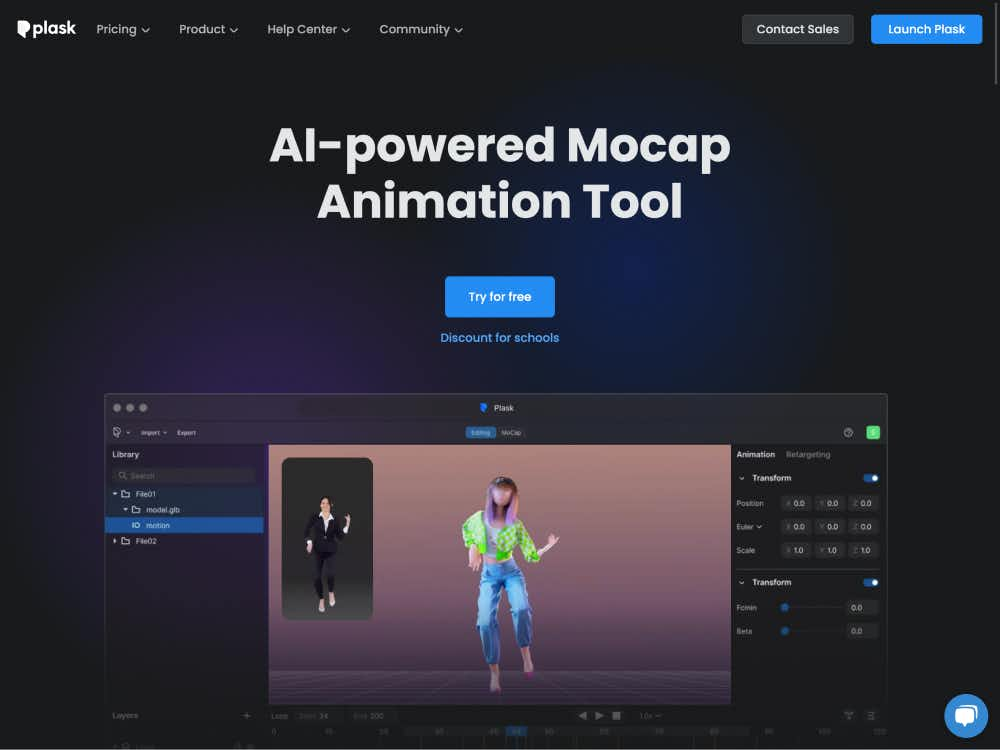
प्लास्क, AI-संचालित मोशन कैप्चर का उपयोग करके वीडियो को उच्च-गुणवत्ता वाले 3D एनिमेशन में बदल देता है। मिनटों में पात्रों को एनिमेट करें और ब्लेंडर, माया, यूनिटी आदि में एक्सपोर्ट करें—बिना किसी मोशन सूट की ज़रूरत के।
प्लास्क एक ब्राउज़र-आधारित प्लेटफ़ॉर्म है जो आपको उन्नत AI मोशन कैप्चर का उपयोग करके साधारण वीडियो फ़ुटेज को पेशेवर 3D एनिमेशन में बदलने की सुविधा देता है। स्वतंत्र रचनाकारों से लेकर AAA स्टूडियो तक, प्लास्क किसी को भी महंगे उपकरणों या जटिल सॉफ़्टवेयर की आवश्यकता के बिना, आसानी से पात्रों को एनिमेट करने में सक्षम बनाता है।
स्क्वायर एनिक्स, नेक्सॉन और एक्टिविज़न जैसी वैश्विक कंपनियों द्वारा इस्तेमाल किया जाने वाला प्लास्क बेजोड़ पहुँच के साथ स्टूडियो-गुणवत्ता वाले परिणाम प्रदान करता है। चाहे आप गेम एनिमेशन बना रहे हों, सिनेमाई दृश्य बना रहे हों, या वायरल वीडियो बना रहे हों, प्लास्क पूरी प्रक्रिया को सुव्यवस्थित बनाता है।
किसी भी वीडियो से शुरुआत करें—स्मार्टफोन क्लिप, वेबकैम रिकॉर्डिंग या डाउनलोड की गई फ़ुटेज। प्लास्क का AI तुरंत गति डेटा निकालता है और शरीर की गतिविधियों को उच्च सटीकता से पहचानता है।
एक डिफ़ॉल्ट मॉडल चुनें या अपना खुद का 3D कैरेक्टर अपलोड करें (MMD और VRM फ़ॉर्मैट सपोर्ट करता है)। कैप्चर की गई गति स्वचालित रूप से आपके मॉडल पर मैप हो जाती है, जिसमें ब्लिंकिंग और फ़िज़िक्स-आधारित एनिमेशन भी शामिल हैं।
अंतर्निहित उपकरणों के साथ, आप प्रकाश व्यवस्था जोड़ सकते हैं, कैमरा कोण सेट कर सकते हैं, और मोशन ब्लर और डेप्थ-ऑफ-फील्ड जैसे सिनेमाई प्रभाव लागू कर सकते हैं — ये सब सीधे ब्राउज़र में।
अपने एनिमेशन को रेंडर किए गए वीडियो या 3D डेटा के रूप में निर्यात करें जो अनरियल इंजन, यूनिटी, माया, ब्लेंडर आदि के साथ संगत हो। प्लास्क लोकप्रिय फ़ॉर्मैट का समर्थन करता है और मौजूदा पाइपलाइनों में आसानी से एकीकृत हो जाता है।
प्लास्क एक ही वीडियो इनपुट से उच्च-सटीकता वाली मोशन ट्रैकिंग प्राप्त करता है—इसके लिए किसी मोशन कैप्चर सूट या विशेष उपकरण की आवश्यकता नहीं होती। यह गेम्स, फिल्मों और एक्सआर अनुप्रयोगों के लिए उपयुक्त यथार्थवादी शारीरिक गतिविधियों को कैप्चर करता है।
टोन मैपिंग, विगनेट्स और ऑटोफोकस डेप्थ-ऑफ-फील्ड जैसे पेशेवर प्रभावों से अपने 3D दृश्यों को बेहतर बनाएँ। ये उपकरण आपके एनिमेशन को कम से कम प्रयास में जीवंत बनाने में मदद करते हैं।
कस्टम 3D कैरेक्टर अपलोड करें या बिल्ट-इन अवतार का उपयोग करें। विभिन्न प्लेटफ़ॉर्म और इंजनों पर उपयोग के लिए BVH, FBX और VMD सहित व्यापक रूप से समर्थित फ़ॉर्मैट में एनिमेशन निर्यात करें।
स्वतंत्र और पेशेवर गेम डेवलपर बिना मोशन कैप्चर स्टूडियो के भी तेज़ी से कैरेक्टर एनिमेशन तैयार कर सकते हैं। प्लास्क गेम इंजनों में आम तौर पर इस्तेमाल होने वाले ह्यूमनॉइड रिग्स को सपोर्ट करता है और इसमें यूनिटी और अनरियल के लिए एक्सपोर्ट विकल्प भी शामिल हैं।
एनिमेटेड वर्चुअल इन्फ्लुएंसर, VR कैरेक्टर या सोशल मीडिया अवतार बनाएँ। Plask का यथार्थवादी मोशन कैप्चर वर्चुअल YouTubers, TikTok क्रिएटर्स और इमर्सिव मीडिया प्रोजेक्ट्स के लिए एकदम सही है।
प्लास्क सरल वीडियो रिकॉर्डिंग को जटिल 3D कैरेक्टर मूवमेंट में बदलकर एनीमेशन प्रोडक्शन को गति देता है। लघु फिल्मों, एनिमेटेड दृश्यों या प्री-विज़ुअलाइज़ेशन के लिए बेहतरीन।
प्लास्क का सहज इंटरफ़ेस 3D एनिमेशन को सभी स्तरों के रचनाकारों के लिए सुलभ बनाता है। शुरुआती लोग मिनटों में एनिमेशन तैयार कर सकते हैं, जबकि पेशेवर स्टूडियो वर्कफ़्लो के लिए आउटपुट को बेहतर बना सकते हैं।
किसी डाउनलोड या इंस्टॉलेशन की ज़रूरत नहीं है। प्लास्क सीधे ब्राउज़र में चलता है, जिससे आप कहीं से भी एनिमेशन बना सकते हैं। क्लाउड रेंडरिंग और रीयल-टाइम प्रीव्यू आपके वर्कफ़्लो को कुशल बनाए रखते हैं।
प्लास्क आवश्यक सुविधाओं तक पहुँच के साथ एक निःशुल्क योजना प्रदान करता है। सशुल्क योजनाओं में उन्नत उपकरण, उच्च निर्यात सीमाएँ और व्यावसायिक उपयोग के अधिकार शामिल हैं। शैक्षणिक उपयोगकर्ताओं और टीमों के लिए छूट उपलब्ध है।
डिस्कॉर्ड के ज़रिए प्लास्क के रचनात्मक समुदाय से जुड़ें, दस्तावेज़ों में ट्यूटोरियल ब्राउज़ करें और ब्लॉग के ज़रिए अपडेट रहें। अगर आप किसी समस्या में फँस जाते हैं, तो एक रेस्पॉन्सिव सपोर्ट टीम आपकी मदद के लिए उपलब्ध है।