
DeepMotion
DeepMotion: KI-gestützte 3D-Animation aus Text und Video
Kostenlos
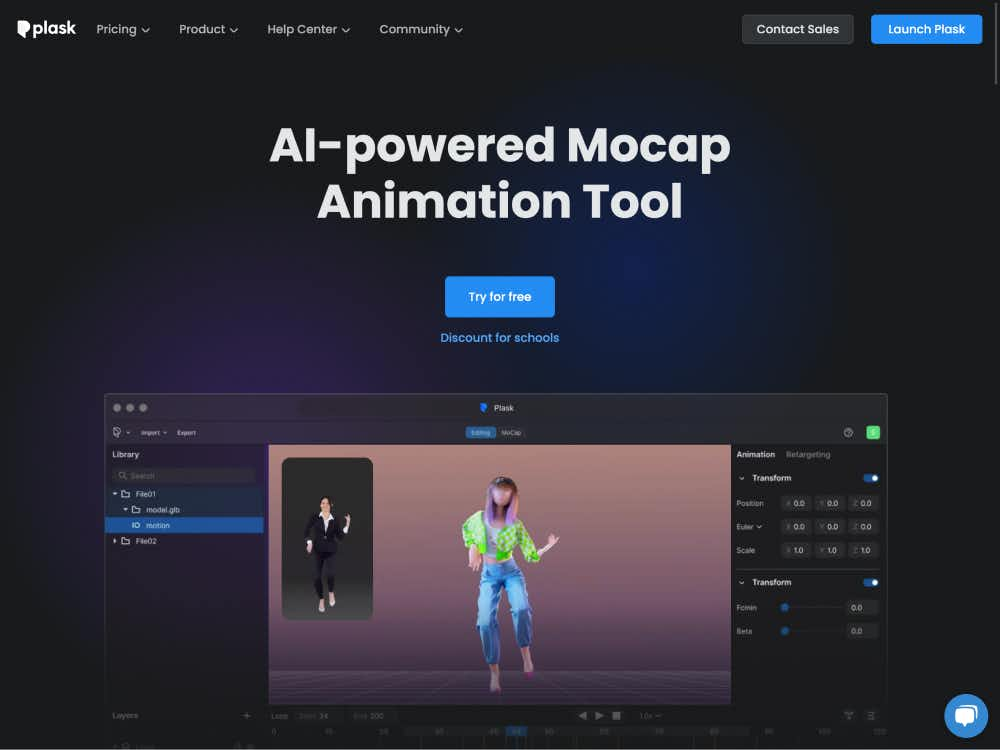
Plask wandelt Videos mithilfe KI-gestützter Bewegungserfassung in hochwertige 3D-Animationen um. Charaktere lassen sich in wenigen Minuten animieren und in Blender, Maya, Unity und weitere Programme exportieren – ein Motion-Anzug ist nicht erforderlich.
Plask ist eine browserbasierte Plattform, mit der sich einfaches Videomaterial mithilfe fortschrittlicher KI-gestützter Bewegungserfassung in professionelle 3D-Animationen verwandeln lässt. Von Indie-Künstlern bis hin zu AAA-Studios — mit Plask kann jeder unkompliziert Charaktere animieren, ohne teure Ausrüstung oder komplexe Software zu benötigen.
Plask wird von globalen Unternehmen wie Square Enix, Nexon und Activision eingesetzt und liefert Ergebnisse in Studioqualität bei unübertroffener Benutzerfreundlichkeit. Egal ob Spielanimationen, Filmsequenzen oder virale Videos — Plask optimiert den gesamten Prozess.
Verwenden Sie ein beliebiges Video — Smartphone-Clips, Webcam-Aufnahmen oder heruntergeladenes Material. Die KI von Plask extrahiert sofort Bewegungsdaten und identifiziert Körperbewegungen mit hoher Genauigkeit.
Wählen Sie ein Standardmodell oder laden Sie Ihre eigene 3D-Figur hoch (unterstützt MMD- und VRM-Formate). Die erfasste Bewegung wird automatisch auf Ihr Modell übertragen, inklusive Blinken und physikbasierter Animationen.
Mit integrierten Werkzeugen können Sie Beleuchtung hinzufügen, Kamerawinkel festlegen und filmische Effekte wie Bewegungsunschärfe und Tiefenschärfe anwenden — alles direkt im Browser.
Exportieren Sie Ihre Animationen als gerenderte Videos oder als 3D-Daten, die mit Unreal Engine, Unity, Maya, Blender und weiteren Programmen kompatibel sind. Plask unterstützt gängige Formate und lässt sich problemlos in bestehende Workflows integrieren.
Plask ermöglicht hochpräzise Bewegungserfassung mit nur einem Videoeingang — weder Motion-Capture-Anzug noch Spezialausrüstung sind erforderlich. Es erfasst realistische Körperbewegungen, die sich für Spiele, Filme und XR-Anwendungen eignen.
Verbessern Sie Ihre 3D-Szenen mit professionellen Effekten wie Tonwertkorrektur, Vignettierung und automatischer Tiefenschärfe. Diese Werkzeuge helfen Ihnen, Ihre Animationen mit minimalem Aufwand zum Leben zu erwecken.
Laden Sie eigene 3D-Charaktere hoch oder verwenden Sie integrierte Avatare. Exportieren Sie Animationen in weit verbreiteten Formaten wie BVH, FBX und VMD zur Verwendung auf verschiedenen Plattformen und Engines.
Indie- und professionelle Spieleentwickler können mit Plask schnell Charakteranimationen erstellen, ohne Motion-Capture-Studios zu benötigen. Plask unterstützt in Game-Engines gängige humanoide Rigs und bietet Exportoptionen für Unity und Unreal.
Erstellen Sie animierte virtuelle Influencer, VR-Charaktere oder Social-Media-Avatare. Plasks realistische Motion-Capture-Technologie eignet sich perfekt für virtuelle YouTuber, TikTok-Creator und immersive Medienprojekte.
Plask beschleunigt die Animationsproduktion, indem es einfache Videoaufnahmen in komplexe 3D-Charakterbewegungen umwandelt. Ideal für Kurzfilme, animierte Szenen oder die Vorvisualisierung.
Plasks intuitive Benutzeroberfläche macht 3D-Animationen für Kreative aller Erfahrungsstufen zugänglich. Anfänger können innerhalb von Minuten Animationen erstellen, während Profis die Ergebnisse für Studio-Workflows feinabstimmen können.
Es sind keine Downloads oder Installationen erforderlich. Plask läuft direkt im Browser, sodass Sie von überall aus animieren können. Cloud-Rendering und Echtzeit-Vorschauen sorgen für einen effizienten Workflow.
Plask bietet einen kostenlosen Tarif mit Zugriff auf die wichtigsten Funktionen. Kostenpflichtige Tarife schalten erweiterte Tools, höhere Exportlimits und kommerzielle Nutzungsrechte frei. Rabatte sind für akademische Nutzer und Teams verfügbar.
Tritt der kreativen Plask-Community auf Discord bei, stöbere in den Tutorials der Dokumentation und bleibe über den Blog auf dem Laufenden. Bei Fragen oder Problemen steht dir unser hilfsbereites Support-Team zur Seite.